
How to Build an AI Content Calendar
Learn how to build an AI content calendar with pillars, audits, scored topics, buffer slots, human-approved drafts, repurposing, and measurement loops.

How to build an AI content calendar
An AI content calendar is a system where AI helps with strategy, ideas, scheduling, drafts, and repurposing, and humans approve each step. You define pillars and audience first, use AI to generate and score topics, then link the calendar to production and measurement. This guide covers that full system, not a tool list.
Prerequisites: what you need before you start
You need strategy inputs and a simple stack before any AI prompt pays off. Without objectives, audience definition, and existing content data, AI only produces generic calendars that ignore your market.
Gather these foundations first:
- Business objectives: What the content must drive (pipeline, organic traffic, retention, or brand).
- Audience definition: Ideal customer profile, pains, jobs to be done, and channels they use.
- Content audit data: Live URLs, traffic, rankings, and engagement from Google Search Console and analytics.
- Keyword and topic data: Seed keywords, competitor themes, and questions your buyers actually ask.
- An AI workspace: ChatGPT, Claude, Gemini, or a similar LLM for ideation and drafting.
- A calendar home: Google Sheets, Notion, Airtable, or a scheduler such as CoSchedule, Buffer, or Hootsuite.
AI speeds work you already framed. It cannot invent a durable strategy from a blank chat. If you still need the strategy layer before the calendar, use AI Content Strategy: A Practical Guide to lock goals and positioning, then return here to put them into practice.
Step 1: Define your objectives and audience
Objectives and audience must come before any calendar prompt. AI is weak at guessing your business context. Feed it your ICP, goals, constraints, and success metrics so every later topic sits inside a real plan.
Write two short briefs humans can reuse and AI can re-read:
- Objectives brief: primary goal, time horizon, non-goals, and the metrics that count (for example organic sessions, demo requests, email signups).
- Audience brief: who you serve, their trigger moments, objections, preferred formats, and what "helpful" means in their words.
Use a prompt like this (paste your real notes):
You are a content strategist. Using ONLY the inputs below, write:

1. a 120-word objectives summary with primary metric and constraints
2. an ICP profile (role, pains, desired outcomes, content preferences)
3. three content success criteria for the next 90 days

Inputs:
- Business:
- Product/offer:
- ICP notes:
- Goals and constraints:
- Channels we already use:

Do not invent facts. Flag missing inputs as questions.
Keep the output as a living doc next to the calendar. Every later prompt should reference this brief so topic ideas stay aligned instead of drifting into generic "thought leadership."
Step 2: Audit your existing content
Audit before you generate. Inventory what already ranks, converts, or underperforms so AI fills gaps instead of rewriting winners or proposing duplicates you already published.
Export a working sheet from Google Search Console and your CMS or analytics:
- URL or title
- Target query (if known)
- Clicks, impressions, average position, CTR
- Publish or update date
- Format (blog, landing page, social series, email, video)
- Status note (keep, update, merge, retire)
Then feed a cleaned subset to AI:
Analyze this content inventory. Identify:
1. top performers by clicks and CTR
2. high-impression, low-CTR pages (refresh candidates)
3. topic gaps vs our pillars and ICP
4. likely cannibalization clusters (similar URLs competing)

Return a table: Gap or issue | Evidence | Recommended action | Priority.

Inventory:
[paste rows]
Pillars and ICP:
[paste briefs]
This step is what strong process guides stress and many quick generators skip. The audit becomes the evidence layer for pillars, scores, and the next planning cycle.
Step 3: Build your content pillars and keyword clusters
Content pillars are the 3–5 enduring themes your brand owns. Clusters hang under each pillar as related articles and assets that build topical authority rather than random one-off posts.
Most teams run best with three to five pillars. Fewer than three forces everything into vague buckets. More than five fragments ownership and dilutes authority. Map this way:
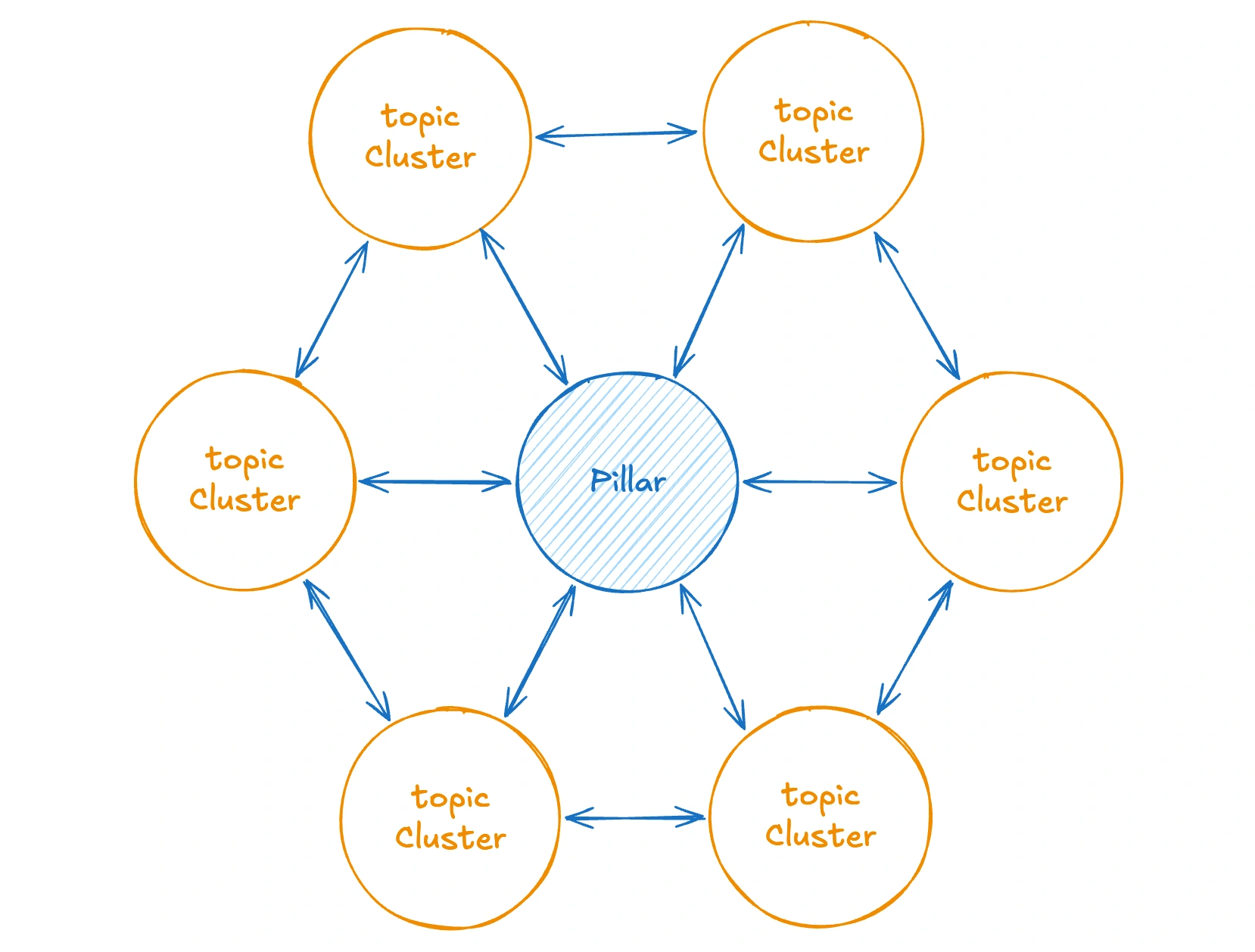
Use AI to cluster keywords, not invent pillars from thin air:
Cluster these keywords and questions under 3–5 pillar themes that fit our ICP and objectives.
For each pillar provide: pillar name, who it serves, 8–12 cluster topics, primary intent per topic, and notes on overlap with our existing URLs.
Do not create pillars outside the business context.

Keywords/questions:
[paste]
ICP + objectives:
[paste]
Existing top URLs:
[paste]
Anchor the model in established SEO practice. HubSpot’s topic cluster framework explains pillar-to-cluster internal linking. Ahrefs’ topical authority guide explains why depth in a theme beats scattershot publishing. Your calendar should show pillar coverage over time, not only post dates.
Step 4: Generate topics with AI (with prompt templates)
Generate topics only after pillars, audience, and audit data exist. That context is what turns AI from a random idea machine into a planning assistant. For the wider approach to planning systems, see AI Content Calendar & Planning: The Complete Guide.
Run generation per pillar, not as one giant dump.
Prompt A: pillar topic batch
Generate 20 topic ideas for this pillar only.
Inputs: pillar definition, ICP, audit gaps, and seed keywords.
For each topic return: working title | primary query angle | search intent | format (blog, social series, email, video) | why it fills a gap | related existing URL if any.
Avoid duplicating the inventory titles.

Pillar:
ICP:
Audit gaps:
Keywords:
Prompt B: intent clustering
Reorganize these topics by search intent: informational, commercial investigation, transactional, and navigational/brand.
Flag which intents we are over- or under-serving relative to our objectives.
Topics:
[paste]
Objectives:
[paste]
Prompt C: angle and hook pass
For the top 10 topics, propose one differentiated angle and one concrete hook that fits our brand voice notes.
Reject generic listicle framing unless the query demands it.
Voice notes:
[paste]
Topics:
[paste]
Save accepted topics into the sheet or Notion database with fields for pillar, intent, format, source (AI + human), and status. Humans trim ruthlessly. Volume is cheap; fit is the filter.
Step 5: Score and rank topics
Rank topics with a simple score: demand × effort × strategic fit. That answers which AI-generated topics to publish first without relying on gut feel alone.
Define the dimensions in plain language:
- Demand: evidence of interest (impressions, keyword demand proxies, sales questions, social engagement on related posts).
- Effort: research depth, original assets needed, design or expert interviews, legal review.
- Strategic fit: proximity to revenue narrative, pillar balance, and sales enablement value.
Pull Demand data from Google Search Console plus a keyword tool such as Semrush or Ahrefs (volume, difficulty, related queries). For stack comparisons, including OpenSEO and DataForSEO for API-first setups, see Best AI SEO Tools: Top Picks Compared. Score with real exports, not model guesses.
Scoring prompt:
Score each topic from 1–5 on Demand, Effort (5 = easiest), and Strategic fit using ONLY the data provided.
Compute a priority score = Demand × Effort × Strategic fit.
Return a ranked table with short rationale and a recommended publish tier: Now / Next / Later.
Call out low-confidence scores where data is missing.

Topics + available data:
[paste]
Pillar balance goals:
[paste]
Translate ranks into publish order: ship "Now" tiers first, mix a few easier wins with one harder pillar piece each cycle, and park "Later" ideas without deleting them. Re-score when Search Console or CRM evidence changes. The score is a decision aid, not a law.
Step 6: Schedule with buffer slots and cadence rules
Assign topics to dates with a fixed cadence and open space for reality. A full calendar with zero slack breaks the first time a product launch, newsjacking moment, or sales request arrives.
Practical rules that work for most small teams:
- Plan one month in detail, with a light view of the next quarter’s pillars.
- Review pillars quarterly, not every week.
- Reserve 20–30% buffer slots for reactive or timely content.
- Balance formats so one channel or one pillar does not dominate a single week.
Spacing prompt:
Review this draft calendar for the next 4 weeks.
Flag: topic fatigue (too similar angles in a short window), pillar imbalance, intent pile-ups, missing buffers, and risky same-day format collisions.
Propose swaps while preserving priority tiers.
Target buffer: 20–30% open or lightly held slots.

Draft calendar:
[paste]
Pillars and cadence rules:
[paste]
How far ahead should you plan with AI? Monthly production detail plus quarterly theme planning is enough for most teams. Longer frozen calendars age poorly because demand signals and product context move faster than a six-month topic list.
Step 7: Document a per-slot workflow
Each calendar entry should carry a mini production manual, not only a title and date. That is what turns a list into an operating system other people can run without tribal knowledge.
Use fields inspired by practitioner workflow docs (including the per-slot structure discussed in Ravitz’s AI content calendar guide):
Example row:
Document the workflow once per recurring slot type (weekly LinkedIn carousel, biweekly SEO article, monthly newsletter). Reuse it. The calendar then answers not only what ships, but how it ships.
Step 8: Draft, voice-check, and approve
Production is where most time still lives. Use AI for structure and first drafts. Keep humans on voice, facts, and "should we publish this at all?"
A reliable three-prompt draft chain:
1) Outline
Create a detailed outline for [topic] aimed at [ICP] with intent [intent].
Use our pillar angle and include suggested H2/H3s, evidence needed, internal link opportunities, and a CTA aligned to [objective].
Inputs: [brief + keywords + must-cover points]
2) Draft
Write a full draft from this outline in plain, specific language.
Prefer short paragraphs and concrete examples.
Do not invent statistics, quotes, or product claims.
Bracket any claim that needs a human source as [SOURCE NEEDED].
Outline + voice notes: [paste]
3) Refine
Tighten this draft for clarity and scannability.
Cut repetition, strengthen the opening answer, and make each section start with the point.
Keep factual brackets intact.
Draft: [paste]
Then run a separate voice-check against real brand samples:
Compare this draft to the brand voice examples.
List mismatches in tone, jargon, confidence level, and sentence rhythm.
Produce a revised version that stays faithful to facts while matching voice.
Flag residual risks for human edit.
Voice examples: [paste 2–3 samples]
Draft: [paste]
Human-in-the-loop approval is non-negotiable. AI is strong at first drafts, structure, alternatives, and repurposing. AI is weak at brand voice without examples, original research, legal nuance, and performance prediction. Treat model output as material, not as the final shipped asset. For the full lifecycle version of this split, including how to right-size review depth by content risk, see AI Content Planning Workflow: Best Practices.
Step 9: Repurpose across channels
Build repurposing into the slot, not as an optional afterthought. One strong pillar article can feed a week of distribution when you apply a fixed chain.
A practical atomization path:
- Core article or long-form post
- Email snippet or newsletter block
- Three to five social posts (LinkedIn, X, or community)
- Short video or reel script outline
- LinkedIn carousel or slide outline
Repurposing prompt template (aligned with multi-prompt chains practitioners such as Lilach Bullock describe):
Repurpose the approved source content into:
1) 5 social posts with platform notes
2) 1 email blurb (90–120 words) + subject lines
3) 1 short video script outline (45–60 seconds)
4) 1 carousel outline (6–8 slides)
Keep claims identical to the source. Adapt hooks per channel. Include UTMs placeholders.

Source:
[paste final content]
Audience:
[paste]
Offer/CTA:
[paste]
How do you repurpose with AI across channels? Standardize the chain, lock the approved source first, then generate derivatives and edit for channel norms. Put derivative due dates on the same calendar row or as child tasks so distribution does not depend on memory.

Step 10: Measure and feed performance back in
A calendar improves only when performance data re-enters planning. Close the loop every month: pull results, interpret with AI, then adjust scores, pillars, and workflows.
Pull a core dataset:
- Search: Google Search Console clicks, impressions, CTR, position for shipped URLs
- On-site: conversions or assisted goals tied to content
- Social and email: reach, saves, replies, click-through on derivatives
- Ops: cycle time from brief to publish, revision rounds, buffer usage
Feedback prompt:
Using this performance export and our calendar log, recommend:
1) topics/pillars to double down on
2) pages to update (with why)
3) formats underperforming relative to effort
4) topics to pause
5) changes to next month’s scoring weights
Cite only patterns visible in the data. Separate evidence from opinion.

Performance data:
[paste]
Calendar log (titles, pillars, formats, dates):
[paste]
Objectives:
[paste]
Practitioner benchmarks help set expectations without pretending to be lab studies. Ravitz estimates that automating first drafts of five weekly assets can save about 8–12 hours per week (roughly 400–600 hours per year). Hootsuite’s content calendar tools guide cites that 81% of marketing tech leaders are piloting or using AI agents; treat that figure as reported by Hootsuite and verify the underlying study if you need it for executive reporting.
Measurement output becomes next month's topic list, refresh queue, and workflow tweaks.
Common mistakes (and how to fix them)
Most failed AI calendars fail for process reasons, not model quality. Fix the operating errors below before you switch tools.
Calendar too dense, no buffers Fix: Cap planned slots and hold 20–30% open for reactive work.
Topics too generic Fix: Require pillar definitions, ICP notes, and audit gaps in every generation prompt.
No documented AI workflow Fix: Add per-slot fields for inputs, prompt chain, owner, and review so the system survives handoffs.
Skipping voice checks Fix: Maintain a brand sample pack and run a dedicated voice-check pass before approval.
Treating AI output as final Fix: Enforce human approval for claims, CTAs, and brand-sensitive language. Ship only after edit.
No measurement loop Fix: Schedule a monthly performance review that re-scores topics and updates pillars with Search Console and channel data.
Planning without production capacity Fix: Size the calendar to real writing, design, and review hours. A beautiful backlog still is not shipped content.
When something feels off, check inputs and workflow documentation before you blame the model.
Should you fully automate with AI agents?
Automate calendar plumbing and drafts; keep strategy and brand decisions with humans. Full hands-off content engines still need people for choices that affect brand and revenue.
For connectors, use Make or Zapier to move approved drafts into WordPress or social schedulers, attach UTM conventions, and notify reviewers. Dedicated social tools and AI writing add-ons often fall in roughly the $27–$129 per month band noted by Apaya, depending on seat count and feature depth; confirm live pricing before you buy.
Can you fully automate with AI agents? Automate distribution plumbing, first-draft production, and reporting drafts. Keep humans on strategy, approval, and research. Framework overviews such as Meta AI’s guide to creating a content calendar with AI are useful for structured steps and benefits, but they do not remove the need for editorial judgment.
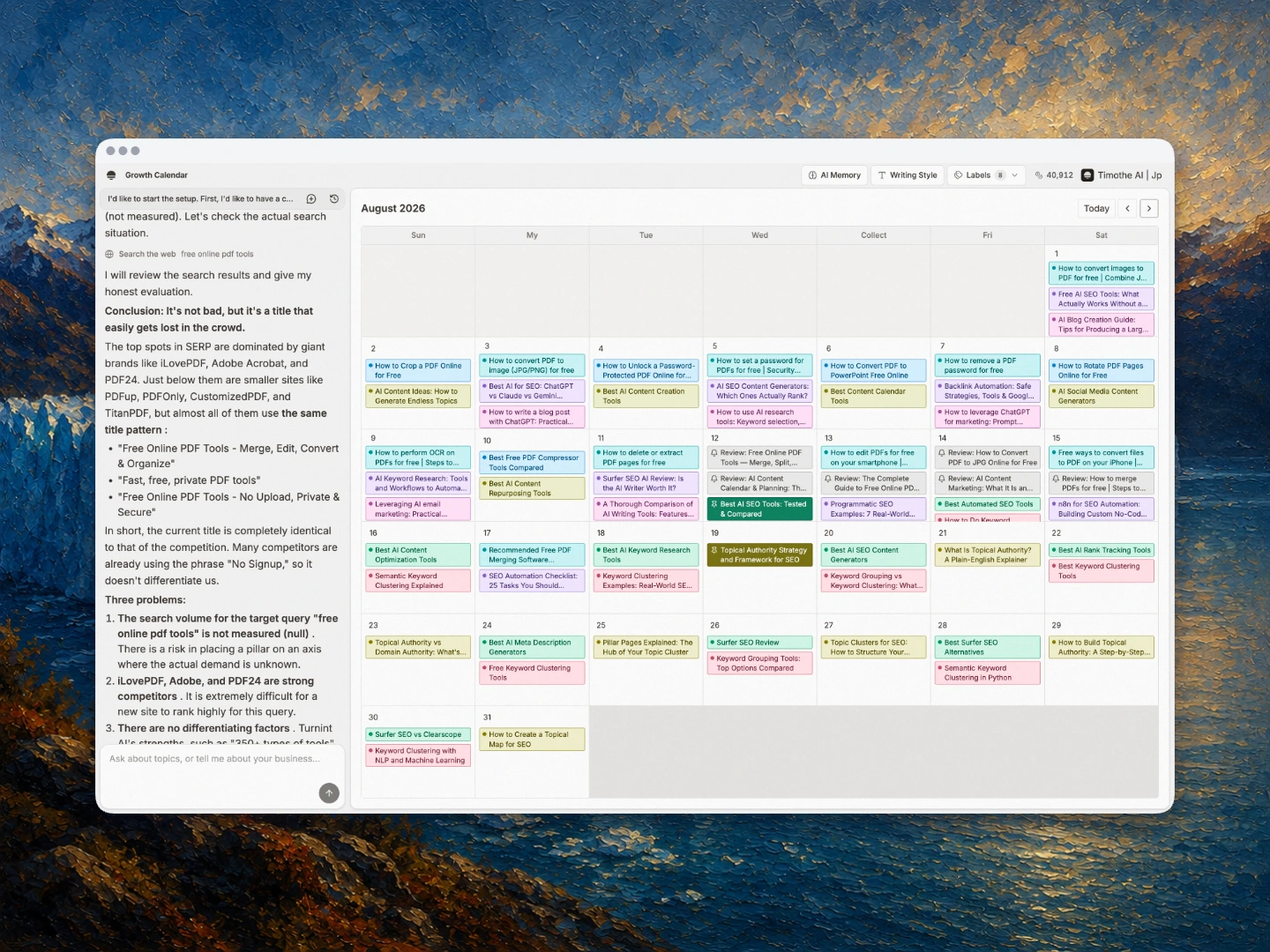
My own answer, from running this blog on a scheduled pipeline: automate up to the draft, keep approval human. A planning conversation in Growth Calendar fixes topic clusters and dates for the weeks ahead; drafts arrive on that schedule, and I spend 15 to 60 minutes editing each one before it ships. The calendar screenshot in Step 6 is that system in production. Full automation would remove exactly the step where my remaining time goes, which is also where the quality lives: fact-checking and voice. What scheduling genuinely removed was the daily "what do I write next?" decision, and that removal, more than drafting speed, is what has kept the cadence unbroken.
FAQ
What is an AI content calendar and how is it different from a regular content calendar?
A normal editorial calendar plus AI support for ideation, scoring, drafting, repurposing, and reporting. The structure (pillars, dates, owners, reviews) stays human-designed. AI changes speed and breadth, not accountability.
What inputs does AI need to generate a good content calendar?
Objectives, audience or ICP notes, content pillars, audit data, and keyword or question research. Missing inputs produce generic topics. Garbage in, generic out.
Should I use ChatGPT, Claude, or a dedicated content calendar tool?
Use LLMs such as ChatGPT or Claude for ideation, clustering, drafting, and voice checks. Use Notion AI, Airtable, Google Sheets, CoSchedule, Buffer, or Hootsuite for collaboration, scheduling, and visibility. Most teams need both layers.
How much time does an AI content calendar actually save?
Practitioner estimates vary by scope. Lilach Bullock reports planning a 4-week calendar in under 2 hours with AI. Ravitz estimates 8–12 hours per week saved when first drafts for about five weekly assets are automated. Treat both as practitioner claims, not controlled research. For one more claim of the same kind, with the same caveat: my own blog runs on a 30-minute planning conversation per two weeks of slots, with 15 to 60 minutes of editing per article, down from about two days per article before the pipeline existed.
How do I keep AI-generated content from sounding generic?
Provide brand voice examples, lock claims to real sources, run a voice-check prompt, and require human edit. AI cannot reliably infer your voice without samples, and it should not invent evidence.
Sources and further reading
- Hootsuite content calendar tools guide: reported stat on AI agent adoption among marketing tech leaders (verify underlying study if needed).
- Ravitz.co AI content calendar guide: practitioner time-savings estimate and per-slot workflow thinking.
- Lilach Bullock on automating a content calendar with AI: planning-time claim and repurposing chain approach.
- HubSpot topic clusters: pillar and cluster framework reference.
- Ahrefs topical authority: strategic rationale for depth over scattershot topics.
- Meta AI: how to create a content calendar with AI: step-by-step framework reference.
- Apaya AI content calendar guide: stated pricing range context for AI social tools.